 초보개발자의 성장블로그


CSS 25 box의 border (경계선)
프론트엔드/CSS2021. 4. 3. 21:32


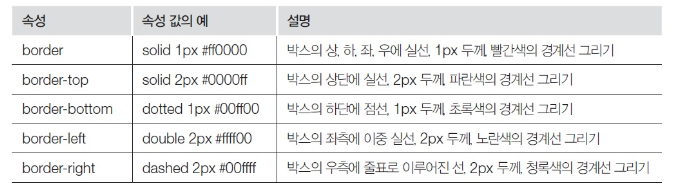
border
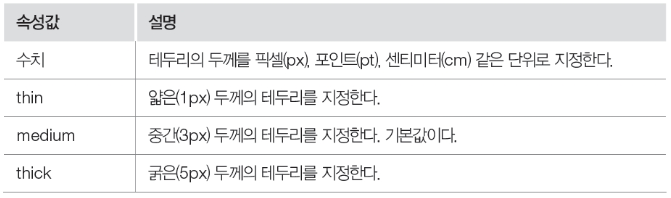
border-width
- 테두리 두께 설정
- Top, bottom, left, right를 이용하여 네 방향으로 설정 가능
border-color
- 테두리 색상 지정

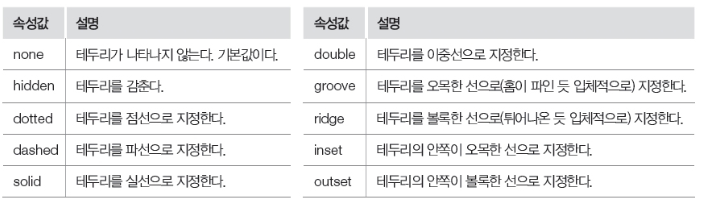
border-style
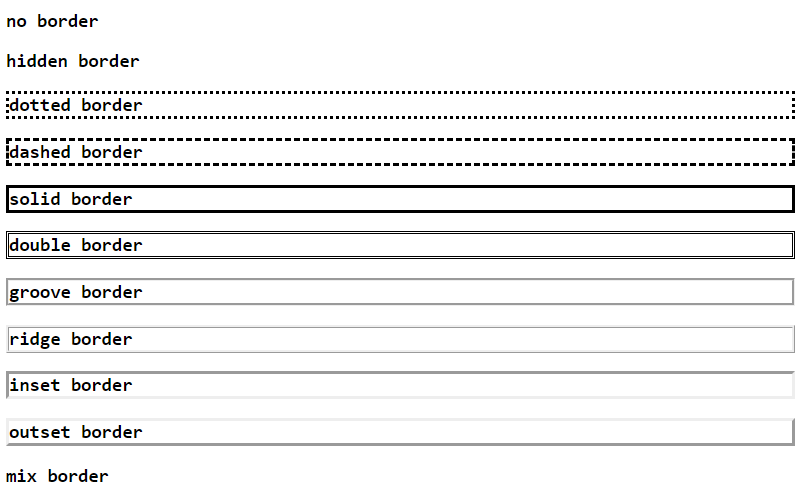
-테두리 스타일 설정
<!DOCTYPE html>
<html lang="en">
<head>
  <meta charset="UTF-8">
  <meta http-equiv="X-UA-Compatible" content="IE=edge">
  <meta name="viewport" content="width=device-width, initial-scale=1.0">
  <title>Document</title>
  <style>
  body{ font-family: consolas; }
  h3.none{ border-style: none; }
  h3.hidden{ border-style: hidden; }
  h3.dotted{ border-style: dotted; }
  h3.dashed{ border-style: dashed; }
  h3.solid{ border-style: solid; }
  h3.double{ border-style: double; }
  h3.groove{ border-style: groove; }
  h3.ridge{ border-style: ridge; }
  h3.inset{ border-style: inset; }
  h3.outset{ border-style: outset; }
  h3.mix{ border-style: dotteddashedsoliddouble; }
  </style>
</head>
<body>
  <h3 class="none">no border</h3>
  <h3 class="hidden">hidden border</h3>
  <h3 class="dotted">dotted border</h3>
  <h3 class="dashed">dashed border</h3>
  <h3 class="solid">solid border</h3>
  <h3 class="double">double border</h3>
  <h3 class="groove">groove border</h3>
  <h3 class="ridge">ridge border</h3>
  <h3 class="inset">inset border</h3>
  <h3 class="outset">outset border</h3>
  <h3 class="mix">mix border</h3>
</body>
</html>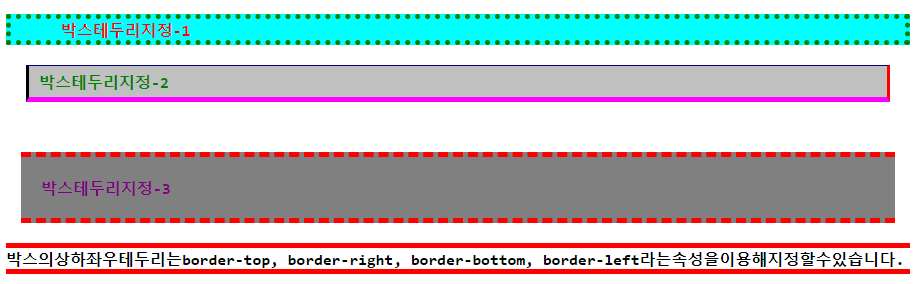
<!DOCTYPE html>
<html lang="en">
<head>
  <meta charset="UTF-8">
  <meta http-equiv="X-UA-Compatible" content="IE=edge">
  <meta name="viewport" content="width=device-width, initial-scale=1.0">
  <title>Document</title>
  <style>
  body{font-weight: bold; font-size: 12pt; font-family: consolas;}

  .bt1{background-color: aqua; color: red;margin-bottom: 15px; padding-left: 50px;
       border-style: dotted; border-width: thick;border-color: green;}

  .bt2{background-color: silver; color: green;margin: 20px; padding: 5px 10px;
       border-style: solid; border-width: 1px 3px 5px 3px;border-color: navy red fuchsia black;}

  .bt3{background-color: gray; color: purple;margin: 50px 15px 20px;padding: 20px;
       border-style: dashed double; border-width: 5px 0px;border-color: red;}

  .bt4{border-top: 5pxsolidred;border-bottom: 5px solid red;}
  </style>
</head>
<body>
  <p class="bt1">박스테두리지정-1</p>
  <p class="bt2">박스테두리지정-2</p>
  <p class="bt3">박스테두리지정-3</p>
  <p class="bt4">박스의상하좌우테두리는border-top, border-right, border-bottom,
                 border-left라는속성을이용해지정할수있습니다.</p>
</body>
</html>
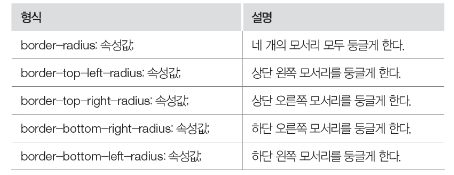
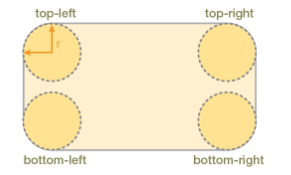
border-radius
-테두리의 모서리를 둥글게 설정

<!DOCTYPE html>
<html lang="en">
<head>
  <meta charset="UTF-8">
  <meta http-equiv="X-UA-Compatible" content="IE=edge">
  <meta name="viewport" content="width=device-width, initial-scale=1.0">
  <title>Document</title>
  <style>
  body{font-weight: bold; font-size: 12pt;}
  .br1{background-color: lime; color: red; border-style: solid; border-width: thick;
       border-color: green;border-radius: 30%;}

  .br2{background-color: maroon; color: yellow;border-style: dotted; border-width: 2px;
       border-color: white;border-radius: 15px 35px;}

  .br3{background-color: teal; color: aqua;border-style: dashed;
       border-width: 5px; border-color: red;border-radius: 5px 15px 25px 35px;}

  .br4{border: 3px solid red;border-top-left-radius: 30px;}
  </style>
</head>
<body>
  <h1 class="br1">둥근모서리스타일링예제1</h1>
  <h1 class="br2">둥근모서리스타일링예제2</h1>
  <h1 class="br3">둥근모서리스타일링예제3</h1>
  <h1 class="br4">둥근모서리스타일링예제4</h1>
</body>
</html>'프론트엔드 > CSS' 카테고리의 다른 글
| CSS 27 box의 shadow (그림자) (0) | 2021.04.03 |
|---|---|
| CSS 26 box의 margin과 padding (0) | 2021.04.03 |
| CSS 24 box content의 크기 설정 (0) | 2021.04.03 |
| CSS 23 box 모델 (0) | 2021.04.03 |
| CSS 22 조합 선택자 (1) | 2021.04.03 |
댓글()