 초보개발자의 성장블로그


CSS 20 기본 선택자 - 속성 선택자
프론트엔드/CSS2021. 4. 3. 15:51



text 속성이름선택자
text 속성이름선택자
text 속성이름선택자
속성과속성값선택자
속성선택없음
<!DOCTYPE html>
<html lang="en">
<head>
  <meta charset="UTF-8">
  <meta http-equiv="X-UA-Compatible" content="IE=edge">
  <meta name="viewport" content="width=device-width, initial-scale=1.0">
  <title>Document</title>
  <style>
  h1[text]{ color: red;background-color: gray; }
  p[text]{ color: blue;background-color: yellow; }
  h1[text="attr3"]{ color: green;background-color: pink; }
  </style>
</head>
<body>
  <h1 text="attr1">text 속성이름선택자</h1>
  <h1 text="attr2">text 속성이름선택자</h1>
  <p text="attr3">text 속성이름선택자</p>
  <h1 text="attr3">속성과속성값선택자</h1>
  <p>속성선택없음</p>
</body>
</html>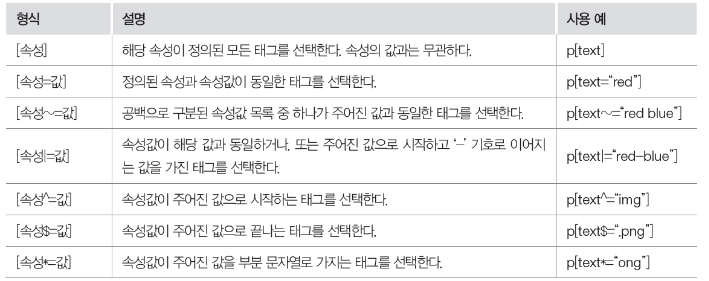
모든텍스트
텍스트매칭속성
리스트매칭속성
범위텍스트매칭속성
텍스트시작매칭속성
텍스트끝매칭속성
텍스트패턴매칭속성
<!DOCTYPE html>
<html lang="en">
<head>
  <meta charset="UTF-8">
  <meta http-equiv="X-UA-Compatible" content="IE=edge">
  <meta name="viewport" content="width=device-width, initial-scale=1.0">
  <title>Document</title>
  <style>
  p[text]{ color: red; }
  p[text="red"]{ color: yellow; background-color: purple; }
  p[text~="bb"]{ color: yellow; background-color: green; }
  p[text|="a1"]{ color: yellow; background-color: blue; }
  p[text^="img"]{ color: yellow; background-color: red; }
  p[text$=".png"]{ color: yellow; background-color: gray; }
  p[text*="ong"]{ color: yellow; background-color: pink; }
  </style>
</head>
<body>
  <p text="hello">모든텍스트</p>
  <p text="red">텍스트매칭속성</p>
  <p text="aa bb cc">리스트매칭속성</p>
  <p text="a1-a2-a3">범위텍스트매칭속성</p>
  <p text="img/pic.jpg">텍스트시작매칭속성</p>
  <p text="img/pic.png">텍스트끝매칭속성</p>
  <p text="Seongyong Hong">텍스트패턴매칭속성</p>
</body>
</html>'프론트엔드 > CSS' 카테고리의 다른 글
| CSS 22 조합 선택자 (1) | 2021.04.03 |
|---|---|
| CSS 21 가상 선택자 (0) | 2021.04.03 |
| CSS 19 CSS의 우선순위 (0) | 2021.04.03 |
| CSS 18 CSS의 사용 위치 (0) | 2021.04.03 |
| CSS 17 list-style-type 과 list-style-image 속성으로 글머리 형태 설정하기 (0) | 2021.03.21 |
댓글()